Project Development
Introduction
This chapter outlines the project's evolution, beginning with the initial ideation phase for both the team and the product. After establishing the core concept, including its physical structure, smart systems, and packaging, the focus shifts to the prototyping stage. Here, we detail the key hardware and software adjustments made to the original design, concluding with an analysis of the test results and final performance.
Ideation
The first Ideation of the team idea can be found in Figure 1.

Here the team already had the idea of keeping the components on the bottom of the bottle, but a more square bottle was kept in mind with a handle that would be comfortable for the user's hand.
The second ideation of TRAQUA already has a more “classic” bottle shape (Figures 2).

For the third design, the team tried to come up with a concept that would either easy fold or just fit inside a backpack very easily. This was quite hard to accomplish, not because of the design but more in terms of the electronic components. It would be very hard to put them into the bottle if the bottle were shaped like in Figure 3.

Flyers
The team also had a few changes in their flyer before coming up with the definite solution. Below we will explore the different flyers the TRAQUA design team came up with.
The team's first flyer had no QR code; the text idea was already there, but the text just lies in boxes that feel out of place alongside the TRAQUA water bottle (Figures 4, 5, 6).


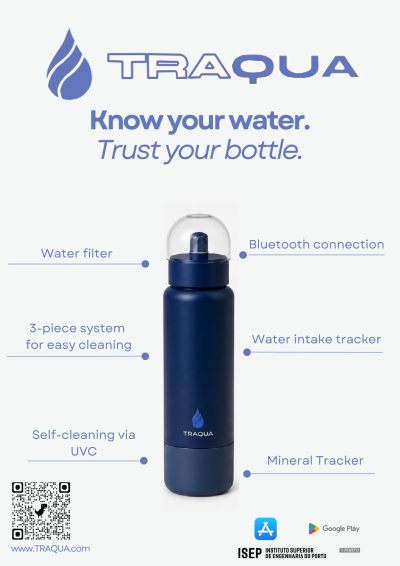
Choice of the subject
Immediately following the initial presentation, the group gathered to evaluate the proposed project tracks and reach a consensus. Our approach was rooted in an open brainstorming session where we weighed our individual strengths against the potential of each topic. It quickly became clear that the “Smartification of Objects” was the path that generated the most genuine enthusiasm among us.
More specifically, we decided to focus on a smart water bottle. This choice wasn't just based on personal interest; after conducting a preliminary market analysis, we identified a significant gap in the current landscape. We felt we could differentiate our product by consolidating multiple features and services into a single, cohesive solution. This sense of opportunity, combined with the fact that every team member felt comfortable and motivated by the technical challenges involved, made the smart bottle the definitive choice for our project.
Brainstorming
Once we settled on the smartification of objects, specifically the smart water bottle, the team held its first dedicated brainstorming session. Because the potential features for a “smart” container are so vast, we needed a way to filter the noise and focus on what actually added value. We turned to Miro to map out these early thoughts, using the boards shown to organize our ideas into functional clusters. This collaborative space was essential not just for tracking our suggestions, but for refining a set of concepts that eventually became the foundation of our final proposal. Figure 7 represents one of the brainstorming activities we did in Miro.

Design Thinking
Figures 8, 9 and 10 showcase the result of the initial brainstorming sessions conducted as part of the Design Thinking process.


Concept
The primary function of the smart bottle is to encourage consistent and healthy water consumption while, in the meantime, eliminating the hygiene concerns commonly associated with reusable water bottles. To achieve this, the bottle integrates five core features into a single device
First, a built-in UV-C sterilization module automatically disinfects the water and the interior surface of the bottle at regular intervals, removing the need for frequent manual cleaning and reducing bacterial buildup. Second, a temperature sensor continuously monitors the drink's temperature and makes this data available to the user in real time. Third, a hydration tracking system records water intake throughout the day and sends customizable reminders when the user falls behind their hydration goal.
All sensor data is transmitted via Bluetooth to a companion mobile application that serves as the central interface for the end user. The app displays all key aspects mentioned above. This ensures that the user remains actively involved in managing their hydration while the bottle handles the more technical tasks autonomously.
The bottle will be prices at approximately 330 €. For mass production the team could look to reduce the production price up to 140 € per bottle. Meaning the end price of the bottle would be around 160 - 220 €.
Design
Material selection
The materials for each component of the smart water bottle were selected based on both functional requirements and aesthetic considerations, ensuring a balance between performance and visual appeal. Polypropylene (PP) is used for the cap due to its durability and ability to withstand repeated use, while also providing a clean and smooth finish that contributes to a modern appearance. The bottle body is made from polished aluminum, chosen not only for its lightweight structure and corrosion resistance, but also for its sleek, reflective surface, which enhances the overall aesthetic and gives the product a premium look. For the compartment containing the electronic components, a plastic material such as polycarbonate is used. This ensures proper electrical insulation and waterproof protection, while also allowing for a precise and refined design that integrates seamlessly with the rest of the bottle. Overall, the combination of these materials supports a design that is durable, safe, and visually appealing for everyday use.
Structure
Figure 11 illustrates the initial structural draft of the product concept. The sketches explore the basic 3-piece concept.
The design contains the main body, which serves as the holder for the water. The top, a removable cap. The cap design also ensures the product can be safely transported without leakage or contamination. A filter integrated at the nozzle is proposed, indicating that the product may be used for dispensing liquids while controlling flow or removing particles. Last, the bottom part that holds all the components. The sketch also demonstrated how the different parts are assembled together, showing connection points and structural alignments.
Overall, these drafts focus on defining the product’s core structure, usability, and functional components before moving into more detailed design stages.

To ensure a coherent and professional presentation of the project, a visual identity was established for TRAQUA. This identity provides consistency across all project deliverables, including the report, presentation, and prototype interfaces.
Logo: The TRAQUA logo combines a water droplet icon with the project name, reflecting the system's core focus on water quality monitoring.
Tagline: “Know your water, trust your bottle.” — summarizing the project's goal of giving users reliable, real-time insight into their water quality.
Color Palette (Monochrome): Three colors form the visual foundation:
#6377BD— primary dark blue, used for headings and key UI elements#D0E3FF— light blue, used for backgrounds and secondary elements#FFF9F0— off-white, used for neutral backgrounds and contrast
The design is summed up in Figure 12.

In order to showcase the appearance of the products, 3D models were created. These models illustrate the structure of the three-part bottle. Figures 13, 14, 15, 16, 17,18,19, 20 present these models.


The final design is shown in Figures 21 and 22.


Finite Element Analysis (FEA) was carried out in SolidWorks to evaluate the bottle's mechanical behavior under two specific scenarios (Figure 23). First, a lateral static load of 100 N was applied to simulate a firm physical grip. The resulting maximum von Mises stress was only 0.203 MPa, showing that daily handling forces are mechanically negligible.
Next, a 1.5-meter drop test was simulated (Figure 24). In this dynamic scenario, the maximum stress peaked at 133.7 MPa, with the impact forces heavily concentrated along the bottom edge of the bottle. To properly protect the internal electronics, two variations for the 0.8–1.0 mm aluminum body were analyzed. When using standard Aluminum the Factor of Safety (FoS) is 1.08. This prevents catastrophic structural failure but leaves a very tight margin against plastic deformation like cosmetic denting. Upgrading the main body to Aluminum (yield strength of approx. 276 MPa) increases the FoS to 2.06, providing a much safer margin.


Smart System
Hardware
Figure 25 This is a system architecture/block diagram for a smart water bottle. At the core is an ESP32 DEVKIT V1 microcontroller that connects to several peripherals: an LED light, accelerometer (LIS3DHTR), TDS sensor (SEN0244), UV-C light, and a pressure sensor (FSR406) with a capacitor. Power is supplied by a battery through a charging circuit. The ESP32 communicates with a mobile application over BLE (encrypted + bonded) using notify/read/write operations. The legend color-codes the lines: red for energy, green for information, and blue for water-related connections.

Figure 26 presents the initial electronic system architecture of the smart bottle prototype. The diagram outlines the integration of the main components and their interactions, serving as a first iteration of the system design. At the core of the system is the ESP32 microcontroller, which manages data processing and communication between all connected components. Several sensors are included to support the intended functionality of the product. A TDS sensor is used to measure water quality, while a temperature and humidity sensor (DHT11) monitors environmental conditions. Additionally, a motion sensor and a force-sensitive resistor (FSR) are incorporated to detect user interaction and usage patterns. The system also includes a UV-C light module, controlled via a transistor circuit, which is intended for sterilization purposes. A display module (SSD1306) is connected via I²C to provide real-time feedback to the user. Power is supplied through a battery management system (BMS) connected to multiple lithium-ion cells. Voltage regulation is handled by a boost converter and linear regulator to provide stable 5 V and 3,3 V outputs required by different components. A USB-C interface is included for charging.
It is important to note that this design represents an initial draft, created to explore component selection and system integration. Certain aspects, such as power efficiency, component optimization, and circuit simplification, will be revised in later iterations.

To ensure the system operates reliably, a power budget was established for all electronic components. Table 1 outlines the voltage, normal and maximum current draw, and resulting power consumption for each component.
| Equipment | Voltage [V] | Inormal [A] | Imax [A] | Pnormal [W] | Pmax [W] |
|---|---|---|---|---|---|
| TDS sensor | 3.3 | 0.003 | 0.006 | 0.0099 | 0.0198 |
| Accelerometer | 3.3 | 0.000002 | 0.000004 | 0.0000066 | 0.0000132 |
| UV-C LED module | 12 | 0.1 | 0.11 | 0.8 | 0.88 |
| Pressure sensor | 3.3 | 0.000264 | 0.00022 | 0.000726 | 0.000726 |
| Temperature sensor | 5 | 0.0001 | 0.0025 | 0.0005 | 0.0125 |
| Microcontroller | 5 | 0.08 | 0.24 | 0.4 | 1.2 |
| TOTAL | 0.358724 | 1.2111326 | 2.1130392 |
Software
In Figure 27 shows how the application works. The application was made with one key concept in mind. Keep most of the “important” values one click away. With that mindset in mind. The application works in the following way. If the users log in for the first time, they enter their height and weight. This will help us determine how much water that person needs to intake per day. Then with 1 click that person can see the water purity and his or her total water intake. He can also start the cleaning process from the app by clicking on the navigation menu on the bottom of the app.

Figure 28 This is a Level 1 Data Flow Diagram (DFD) for a hydration tracking system. It shows an external entity (Water bottle) sending raw readings to a Sensors process (1.0), which passes data to a Process Data process (1.5). That process sends processed data to a Data store, which feeds into a Display on app process (2.0) that delivers hydration info to the User external entity. There's also a legend in the bottom-left defining the DFD notation (rectangles for external entities, circles for processes, open rectangles for data stores).

Software choices
The system consists of four main components: a mobile application, a web application a backend service and an embedded device based on ESP32.
- Mobile Application – The application was developed using EXPO Go, a framework built on top of React Native. The choice was made due to its rapid development capacity, its cross-platform support (iOS and Android), its ease of testing without the requirement of complex native configuration, and the fewer risks of vulnerabilities that React has. Expo Go also enables efficient prototyping and provides access to device features such as Bluetooth, which is essential for communicating with the ESP32.
- Web application – The shop of TRAQUA was done using Svelte due to its lightweight nature, fast performance, and simple reactive model. Unlike traditional frameworks, Svelte compiles components at build time, resulting in highly optimized and efficient code. Figure 29, Figure 30, Figure 31, Figure 32, Figure 33 are screenshots of the website.
- Backend – The backend is planned to be developed using Python in combination with FastAPI. Due to its simplicity, readability and extensive ecosystem. The backend is responsible for handling business logic, data storage, and communication between the web application and other system components.
- ESP32 – The system uses an ESP32 microcontroller, which is well-suited for IoT applications due to its low cost, built-in Wi-Fi and Bluetooth capabilities, and sufficient processing power. The ESP32 is responsible for interacting with hardware components and executing real-time tasks while communicating with the mobile application.
- Communication – Communication between the mobile application and the ESP32 is established using Bluetooth Low Energy (BLE). BLE was selected because it is energy-efficient, widely supported, and ideal for short-range communication between devices
- Security Considerations – Security is an important aspect of the system, particularly in Bluetooth communication. To ensure secure data exchange, several measures are implemented:
- Secure pairing and bonding between devices
- Encryption of Bluetooth communication to prevent interception
- Authentication mechanisms to restrict unauthorized access
- Input validation across all components (mobile app, backend, and ESP32)
Additionally, secure development practices are followed in both the frontend and backend to minimize potential vulnerabilities. These are shown in Figures 29,30,31,32 and 33.


Comparing
The 2 illustrates the mobile framework.
| Criteria | Expo Go (React Native) | Flutter | Native (Swift/Kotlin) |
|---|---|---|---|
| Cross-platform | iOS + Android from one codebase | iOS + Android from one codebase | Separate codebases needed |
| BLE Support | Yes (expo-ble / react-native-ble-plx) | Yes (flutter_blue) | Full native BLE APIs |
| Development Speed | Fast — hot reload, JS/TS | Fast — hot reload, Dart | Slower — two separate apps |
| Testing/Prototyping | Very easy — scan QR to test | Requires emulator or device build | Requires full build per platform |
| Community/Ecosystem | Large (React/JS ecosystem) | Growing rapidly | Mature but platform-specific |
| Learning Curve | Low (JS/TS knowledge) | Medium (Dart) | High (two languages) |
| Chosen | Yes | No | No |
The Table 3 illustrates the WebFramework.
| Criteria | Svelte | React | Vue |
|---|---|---|---|
| Bundle Size | Very small (compile-time) | Larger (virtual DOM runtime) | Medium |
| Performance | High — no virtual DOM overhead | Good — virtual DOM diffing | Good |
| Learning Curve | Low — simple reactive model | Medium — JSX, hooks, state mgmt | Low-Medium |
| Build Output | Highly optimized vanilla JS | Requires runtime library | Requires runtime library |
| Community | Smaller but growing | Largest | Large |
| Chosen | Yes | No | No |
The Table 4 shows the Backend Framework.
| Criteria | FastAPI (Python) | Django (Python) | Express (Node.js) |
|---|---|---|---|
| Performance | High — async, built on Starlette | Moderate — synchronous by default | High — async, event-driven |
| API Development | Built for APIs — auto Swagger docs | Heavier (DRF needed) | Flexible but manual setup |
| Learning Curve | Low | Medium (opinionated, ORM, admin) | Low |
| Data Validation | Built-in (Pydantic) | Manual or via serializers | Manual or via libraries |
| Ecosystem | Growing | Very mature | Very large (JS ecosystem) |
| Chosen | Yes | No | No |
The Table 5 illustrates the comarison of the Microcontroller.
| Criteria | ESP32 | Arduino Uno | Raspberry Pi Pico |
|---|---|---|---|
| Wi-Fi | Built-in | No (shield needed) | Pico W only |
| Bluetooth/BLE | Built-in | No (module needed) | Pico W has BLE |
| Processing Power | Dual-core 240 MHz | Single-core 16 MHz | Dual-core 133 MHz |
| Cost | Low (~5-8 €) | Low (~5 €) | Low (~4-6 €) |
| GPIO Pins | 34 | 14 digital, 6 analog | 26 |
| IoT Suitability | Excellent — designed for IoT | Limited — no wireless | Good but less mature |
| Chosen | Yes | No | No |
Figure 34 explains how the user interacts with the system .

Packaging
Present and explain the: (i) initial packaging drafts; (ii) detailed drawings; (iii) 3D model with load and stress analysis, if applicable.
As part of the TRAQUA project, we developed an innovative packaging solution that meets a dual objective: effectively protecting the bottle while offering a useful second life after purchase. Instead of creating disposable packaging, we chose to design a durable solution that can be reused as an everyday accessory.
Our concept takes the form of a textile sleeve inspired by a puffer jacket, made from recycled airbags. This material, originally designed for automotive safety, has highly valuable properties: it is strong, lightweight, and durable, yet difficult to recycle through conventional channels. Reusing it allows us to adopt a meaningful upcycling approach. Unlike a traditional puffer jacket, our design contains no added padding. Protection is achieved through a multi-layer construction of airbag fabric, combined with a quilted stitching pattern. This structure creates natural air pockets that help absorb shocks during transport, while minimizing the use of additional materials. This technical choice strengthens the environmental consistency of the project by reducing product complexity. To further protect the bottle, a soft towel layer is inserted between the airbag material and the bottle surface. This inner layer completely covers the contact area in order to prevent friction, scratches, or impressions caused by the airbag fabric during transport. The towel lining also improves the overall user experience by adding a softer and more protective interior finish. A key objective of this packaging is to move toward a mono-material design. By primarily using polyamide (the material that airbags are made of), including for stitching and straps, we improve end-of-life recyclability and avoid complex material blends that are difficult to process. Beyond its protective function at the point of sale, this packaging is designed to be reused as a carrying accessory. Equipped with an adjustable shoulder strap, it allows users to easily carry the bottle in their daily lives, while also providing space for small personal items such as a phone or keys. In this way, the packaging becomes a useful and long-lasting object, significantly reducing waste. Figure 35 displays the proposed packaging.

In summary, this packaging solution follows an eco-design approach by:
- upcycling a complex waste material (airbags),
- reducing the number of materials used,
- eliminating unnecessary components,
- protecting both the bottle body and cap during transport,
- and extending the product’s lifecycle through reuse.
This approach reflects TRAQUA's ambition to deliver a solution that is innovative, functional, and environmentally responsible.
Prototype
For the prototype, we use a rigid plastic bottle as the main structure. This material is easy to obtain, lightweight, and resistant, making it suitable for testing our concept. Inside the bottle, we add aluminum foil sheets. The aluminum acts as a reflective surface, allowing the UV-C light emitted by the LED to be reflected throughout the interior of the bottle. This improves the distribution of the light and increases the efficiency of the water disinfection process. We also include a plastic separator at the bottom of the bottle to protect the electronic components. This separator isolates the battery, sensors, and LED from direct contact with the water, ensuring safety and proper functioning during testing. This simple prototype allows us to validate the concept and test the performance of the UV-C cleaning system before developing the final product.
Refer main changes in relation to the designed solution.
Structure
During the prototype phase, several modifications were made compared to the original design in order to simplify the construction process, reduce complexity, and make the product more practical for testing and development. The initial concept was based on a custom ergonomic bottle design, but for the prototype we instead used a Stanley Cup–style gym flask. This differed from the original idea because it provided a ready-made and durable structure that could easily house the components without the need to manufacture a completely custom bottle body. Using an existing flask also reduced production time and allowed the team to focus more on testing the electronic functions of the system.
Another major change concerned the bottle base and sensor mounting. In the original design, the system included a separate base structure intended to contain some of the hardware and provide mounting points for the sensors. In the prototype version, this structure was simplified by attaching the sensors directly to the bottom section of the bottle instead of using a detachable or independent base. Although the base structure was removed, the electronic hardware is still protected inside a custom 3D-printed plastic casing. This downscaled the mechanical design and reduced the number of structural parts required for assembly. To secure and seal the components, superglue and silicone were used during assembly. Superglue was mainly used for mounting and fixing components in place, while silicone was applied to improve sealing and provide protection against water and moisture.
An additional modification was the inclusion of an OLED display. The original design did not include a display screen, but during development an OLED module was added because it was supplied as an extra component by the manufacturer. The display improved the functionality of the prototype by allowing real-time system information and sensor readings to be shown directly to the user. Compared to the initial design, this provided a more interactive and user-friendly experience while also making testing and debugging easier during development.
Hardware
During the prototype development, several hardware changes were made due to mismatches between the original design and the components that were received.
The main issue concerned the battery system. The original design specified a 3S lithium-ion battery pack with a matching 3S BMS. However, 4 18650 batteries and a 4S BMS were received instead. This created a compatibility problem, since a 4S BMS is designed to monitor and balance four cells and cannot be properly used with a 3-cell configuration. It would also result in incorrect voltage levels compared to the intended system design.
After evaluating the available options, the decision was made to use all 4 batteries in series together with the 4S BMS, effectively changing the system to a 4S configuration. Due to this change, the original charging setup was no longer compatible with the new voltage system, and the charging function was therefore omitted from the prototype implementation.
Another modification involved the system fuse. The original design specified a 5A fuse to handle normal operating current and short peaks from components such as the ESP32, sensors, and UV-C LED module. However, a 3A fuse was used instead due to availability. This lowers the maximum current threshold and increases the sensitivity of the protection system, meaning the fuse is more likely to blow during peak load conditions.
Overall, these changes were necessary to adapt to available components, but they also introduced deviations from the original electrical design, particularly in terms of voltage configuration and power system robustness. This schamtics is shown in Figure 36.

Functional Testing Results
To verify the reliability and functionality of the TRAQUA smart bottle prototype, all major electronic and sensing components were tested individually and as part of the integrated system. The table below summarizes the performed tests, expected behavior, obtained results, and final status of each subsystem. Table 6 outlines the voltage, normal and maximum current draw, and resulting power consumption for each component.
| Component / System | Function Tested | Expected Result | Actual Result | Status |
|---|---|---|---|---|
| TDS Water Quality Sensor | Water quality measurement | Detect changes in TDS values accurately | Stable ppm measurements for different water samples | PASS |
| Accelerometer (LIS3DHTR) | Motion and orientation detection | Correctly detect bottle tilt and movement | Accurate orientation measurements with stable readings | PASS |
| Battery Pack (4S Li-ion) | Power delivery | Supply stable voltage to system | Stable voltage supplied during operation | PASS |
| BMS Protection Module | Voltage regulation and protection | Stable input/output operation | Correct voltage regulation observed | PASS |
| Buck Converter (16 V → 5 V) | Voltage step-down conversion | Regulated 5 V output | Stable 5.01 V output achieved | PASS |
| Charger System | Battery charging | Proper charging of 4S battery pack | Charging failed due to configuration mismatch | FAIL |
| UV-C Sterilization Module | UV-C activation and control | Safe activation/deactivation through ESP32 | Correct switching behavior observed | PASS |
| Temperature & Humidity Sensor | Environmental monitoring | Stable temperature and humidity readings | Accurate and stable measurements obtained | PASS |
| Force Sensitive Resistor (FSR) | Water level estimation | Detect weight and fill level changes | Sensor values increased correctly with weight | PASS |
| ESP32 DevKit V1 | System control and communication | Stable operation and Wi-Fi communication | Reliable communication and stable operation | PASS |
Review and Validation Process
Each subsystem of the TRAQUA prototype was tested under practical operating conditions using serial monitoring, voltage measurements, sensor calibration, and repeated functional verification. The tests were designed to evaluate sensor accuracy, communication stability, electrical reliability, and overall system integration.
The obtained results were compared against the expected functionality of each subsystem. Stable measurements, successful communication, and correct component behavior were considered indicators of successful operation. Any abnormal behavior or instability was recorded and evaluated for possible future improvements.
Overall Conclusion
The functional testing confirmed that the TRAQUA smart bottle prototype operates reliably and that all major subsystems function as intended. The sensors, ESP32 microcontroller, UV-C sterilization system, and power management system all produced stable and consistent results during testing.
The only major issue identified during testing was the incompatibility between the charger and the selected 4S battery configuration, which prevented proper charging functionality. Despite this limitation, the prototype successfully met the primary functional requirements and provides a strong foundation for future optimization and development.
Software
Implementation Changes and Prototype Code
Changes Made in Relation to the Designed Solution Temperature sensing — sensor and library change. The initial design used a DS18B20 digital probe driven by the OneWire and DallasTemperature libraries. This was replaced with an SHT21/Si7021-class sensor on the I²C bus, driven by the Adafruit Si7021 library. The change removed the dedicated OneWire data line and its pull-up resistor, simplified wiring to the shared I²C bus, and added relative-humidity measurement at no extra hardware cost. The temperature value is also reused downstream for temperature-compensating the TDS reading.
Additional sensing and output components. Several components were integrated beyond the original sensor set: an analog pressure sensor (used to estimate the water volume in the bottle and, from that, detect drink events), a Gravity TDS meter (replacing the placeholder TDS value with a real, temperature-compensated reading in ppm), a magnetic reed switch (acting as a safety interlock), a UVC light control output, an SSD1306 OLED display, and two status LEDs (green/red) indicating drinking-water quality. The pH value remains a placeholder pending a calibrated pH probe. Safety architecture. Because the prototype includes a UVC light, a reed-switch interlock was added: the firmware forces the UVC output off at every boot and continuously verifies that a magnet is detected before the device operates. The interlock is fail-safe — an open or broken switch reads as “unsafe” and keeps the UVC off.
Development tools and platforms. The Arduino IDE was upgraded from version 1.8.x to 2.x after the older version produced a package-manager fault and slow, un-cached compiles; version 2.x provides working build caching and noticeably faster recompilation. Firmware is built on the Espressif ESP32 Arduino core. Libraries added during development: Adafruit Si7021, Adafruit GFX, Adafruit SSD1306, and Adafruit BusIO; the BLE stack uses the ESP32 BLE Arduino library bundled with the core. Flashing is performed with esptool; because the development board's automatic reset was unreliable, a manual BOOT/EN download-mode procedure was used. Mobile application platform. The app is built with React Native and Expo (expo-router, TypeScript) and uses react-native-ble-plx for Bluetooth Low Energy. A significant platform change was moving from the Expo Go client to a custom Expo development build, because BLE is a native module that cannot run inside Expo Go. Testing was carried out on a physical Android device, since emulators have no Bluetooth radio. Application-level code changes. Three notable changes were made to the app's BLE layer. First, the connection now negotiates an enlarged MTU (247 bytes); the default 23-byte MTU truncated the JSON sensor payload. Second, device scanning was changed to filter by the service UUID rather than by device name, which proved more reliable on recent Android (Samsung) devices. Third, the data model was extended: the SensorReading type gained humidity and bottleVolumeMl fields, the BLE parser was updated to read them, and the global state provider (BottleProvider) gained logic that automatically logs a drink when the measured bottle volume drops.charts.
Prototype Code Flowcharts
Smart device firmware — initialisation (setup)


Tests & Results
This chapter summarizes the testing strategy, the executed test cases, and their outcomes. The full detail lives in the TRAQUA Test Plan and Test Report; what follows is a condensed overview.
Test Management Strategy
Testing for TRAQUA followed a structured, iterative approach aligned with the development sprints and the operational requirements of the smart bottle. Tests were planned, documented, executed, and evaluated at both the component and system levels, and synchronized with project milestones so they stayed current as functionality and architecture evolved.
The following Table 7 shows the testing roles and responsibilities.
| Team Member | Role | Responsibility |
| Bernardo Alves | Test lead | Oversees the testing process, ensures milestones are met, coordinates review and approval |
| Bernardo Alves | Backend test coordinator | Designs and executes tests |
| Maria Włodarczyk | Documentation coordinator | Manages test plan/report consistency, maintains traceability |
| Maximilian Salmi | Data and component tester | Prepares and maintains tests, ensures components meet the standard |
| Guillem Rolduá | Stress tester | Stress tests each component to determine its limits |
| Rieke Platthaus | Frontend test supporter | Validates interface feedback |
| Inès Margand | Frontend test supporter | Validates interface feedback |
Testing Approach and Criteria
The strategy centers on state-transition testing, verifying the system's behavior as it moves between the defined water-safety states: Safe, Warning, Unsafe, and Unknown. The verification covers the full sensing → classification → actuation chain, including the BLE link between the ESP32 firmware and the React Native app. The Unknown state is exercised by simulating poor sensor quality (stale readings, BLE disconnects, malformed JSON payloads) to confirm the system fails safe rather than reporting a stale Safe verdict.
- Entry criteria: use-case documentation approved, test environment configured to mirror production (latest code in the main branch, React Native 0.80, Expo), valid/invalid test data prepared, test cases developed, and the test team ready.
- Exit criteria: all relevant test cases executed successfully, functional correctness validated against expected results, defects recorded and resolved, and the test report generated.
- Suspension criteria: scope change, critical defects, the base product failing to run on a testing device, or unavailable external dependencies/resources.
Testing Resources
- Hardware: ESP32 Wroom 32, OLED screen, TDS sensor (SEN0244), accelerometer, force-sensitive resistor, temperature sensor, magnetic reed switch, MOSFET, buck converter, battery pack (4× NCR18650B, 4S balancing), and supporting power/prototyping components.
- Software: Node.js, Arduino IDE, WebStorm (or similar IDE).
- Tooling: GitHub for test-case creation, tracking, management, and defect management; manual execution; PyCharm and pipelines for unit testing; Postman and PDF/Word for reporting.
Hardware tests
Perform the hardware tests specified in Tests. These results are usually presented in the form of tables with two columns: Functionality and Test Result (Pass/Fail).
Software tests
Our software testing framework directly addresses functionality, performance benchmarks, and user experience using the specific strategies and tools from our workflow:
Functional Testing: We validate our identified use cases and user stories by verifying the system's core behavior. This includes unit testing our individual JavaScript/TypeScript code modules within WebStorm using Node.js, as well as executing API endpoint tests via Postman. We also conduct integration testing across the ESP32 firmware and the React Native mobile application to ensure these components function correctly as a combined entity.
Performance Testing: To evaluate speed, responsiveness, and stability under a workload, we run performance tests focused on data volume, system load, and runtime. These benchmark tests are repeated 10 times to determine precise average results and standard deviations, ensuring the BLE communication link and backend data transmission remain stable over time.
Usability Testing: To ensure the system is intuitive and accessible, we conduct usability testing according to the System Usability Scale (SUS). This allows our frontend team to validate interface feedback, evaluate how easily a user can understand their water safety status (Safe, Warning, Unsafe, Unknown), and confirm that the mobile application provides clear, responsive alerts.
Software tests comprise:
- (i) functional tests regarding the identified use cases / user stories;
- (ii) performance tests regarding exchanged data volume, load and runtime (these tests are usually repeated 10 times to determine the average and standard deviation results);
- (iii) usability tests.
Test Cases
The following Table 8 shows the executed test cases.
| ID | Input Condition | Expected Action | Expected Result |
| TC01 | Connect to the ESP32 | Log result | Connection successful |
| TC02 | Wrong ID in connection | Log result | Connection not successful |
| TC03 | Get TDS value | Log result | TDS value within 50–200 range |
| TC04 | Get temperature value | Log result | Temperature value read in the app |
| TC05 | Gravity sensor | Log result | Reads whether the bottle is tilted |
| TC06 | LED light changes color | Log result | LED shows either green or red |
| TC07 | Pressure sensor estimates water | Log result | Reads total water in the bottle |
| TC08 | UVC light runs | Clean water | Water is cleaned |
| TC09 | Reed switch | UVC to turn on/off | UVC must not run while the switch is connected |
Results Summary
A total of 9 test cases were executed, all of which passed. It must be noted that some aspects of the code could not be tested directly on hardware and were instead validated through simulation.
The following Table 9 shows the test results overview.
| Result | Number | Percentage |
| Passed | 9 | 100% |
| Failed | 0 | 0% |
| Total | 9 | 100% |
All nine test cases (TC01–TC09) returned Passed with no recorded defects.
Summary
This chapter followed the journey of TRAQUA from its idea to a working model. The team started with sketches and eventually decided on a smart water bottle with five main features:
- UV-C sterilisation
- Temperature monitoring
- Water-Quality sensing
- Hydration Tracking
- Mobile app connection over bluetooth
The design team chose the materials created a three-part structure and developed the look. They also made 3D models. Used computer analysis to ensure the aluminium body can handle normal use and survive a 1.5 metre drop.
On the side the team specified the hardware, including an ESP32 chip that controls the sensors UV-C module and power. They also worked on the software creating an app with React Native, a web shop with Svelte and a backend with FastAPI. The team made sure the Bluetooth communication is secure, with pairing, encryption and input checks. They also came up with a eco-friendly packaging solution using recycled airbags.
oving from design to prototype introduced several practical deviations: a ready-made flask replaced the custom body, the battery system shifted from a 3S to a 4S configuration due to the components received, charging was omitted, and an OLED display was added. Functional testing validated almost every subsystem — sensors, power delivery, UV-C control, and ESP32 communication all passed — with the charger being the single failure, caused by the battery-configuration mismatch.
Overall, the prototype meets its primary functional requirements and demonstrates the viability of the TRAQUA concept. The next chapter draws the project to a close, reflecting on how well TRAQUA met its original goals and outlining the directions for future development.